
Building a Computer in R

One Time When R Wasn't a Language for Statistical Computing and Graphics

I recently met Emil Hvitfeldt in person for the first time. We'd interacted a bit online during Advent of Code on the Data Science Learning Community Slack where a bunch of us spent too much time racing through puzzles that were supposed to be recreational. Talking with him reminded me of one of my favorite puzzle shapes: you get a list of instructions, a few named registers and you have to step through the program to see what the machine does. The problem is, more or less, to implement a virtual machine. That was not something I was ever formally taught how to do.
Now, R is famously "a language and environment for statistical computing and graphics." That is the first sentence on the R Project's homepage, and most days, that's exactly what I use it for. But every once in a while, it's worth remembering that R is also just a programming language. You can do normal programming-language things with it. You can also do silly things with it. Building a tiny working computer is one of those silly things.
What follows is a small interpreter for an assembly-style instruction set, written in R using the R6 object system. The thing I want you to take away is the shape of the solution: registers and instruction functions get defined as ordinary, standalone R objects, then composed into an R6 class. Pieces first, then assemble.
What We're Building
The instruction set is intentionally tiny. We start with the registers, a place in a CPU where data is stored. We have five registers named a through e, each holding an integer. Each register starts at the UTF-8 codepoint for the character "0", which is 48.
We have two operations:
add r y which adds the value y to register r
sub r y which subtracts the value y from register r
A program is a sequence of those instructions. After running through all of them, we read the final values out of the registers and convert them back to characters with intToUtf8(). The intent is that the resulting string spells something out.
For a virtual machine to run this, we need three things: somewhere to store state (the registers), something to mutate that state (the instruction functions), and something to drive the whole thing forward (the CPU). We're going to build them in that order, and we're going to build the first two as independent objects before we ever touch R6.
R6 vs. S7: Why I Chose R6
S7 is still somewhat of the new kid on the block. It was designed to be a successor to S3 and S4 and the long-term plan is to merge it into base R. So why am I using the older R6?
S7 objects don't change. When you use a method on one it returns a copy of the original with the changes applied. If you want to update your original, you need to save the new one back to your variable. R6 doesn't do that. It changes the original object without the need to assign. This makes R6 much more qualified to represent a CPU. With parts prices as they are now, I wish using my CPU made new CPUs, but that's just not how it works.
Step 1: Create Registers
Before we worry about a CPU, let's just make registers. Registers are addressable by name and they hold integers. That is, in its entirety, what a register file is.
The puzzle says everything starts at "0", but the machine only deals in integers, so we use utf8ToInt() to get the codepoint once and then reuse it:

That's it. That's the register file. A named list of five integers, all 48. No class, no methods, no ceremony. If something is wrong with how registers work, this is the only place we have to look.
The reason I want this to exist as a standalone object is that it's testable on its own, and it doesn't know anything about a CPU. It's just a list. Whatever comes next can assume registers are there.
Step 2: Define Instruction Functions
Now we need add and sub. Same idea: forget about CPUs for a minute. These are just functions that take a register name r and a value y, then update that register:

There's something a little sneaky going on here. These functions reference self, which doesn't exist in the global environment. On their own, called from the console, these functions would error. They're written as if they were already methods on an R6 object, because that is where they are going to end up. This does make testing a little bit trickier because you need self to exist before testing, but because R uses the same reference scheme for multiple data types, you could test this with a plain list.
Step 3: Supporting Methods
The rest of the class is the part that actually needs to live inside R6, because it's about identity and lifecycle rather than arithmetic.
The object call takes the name of a function, a register, and a value. It looks up the method by name on self, runs it, and then increments the clock:

Note the same self[[fun]] trick we used for registers. Because add and sub are now methods named on self, self[['add']](reg, y) is how we dispatch to them dynamically. The class doesn't need a big switch() statement keyed off the instruction name — the instruction is the method name.
The object run is the loop that drives the whole thing. It keeps stepping until the program counter, self$index, has walked off the end of the instruction list, then returns self so we can inspect the final state:

And .inc is private, because the program counter is none of the user's business:

That's the whole machine. Five registers, two operations, one clock, one loop, and one private incrementer.
Step 4: Combine in R6 Class
Here is the part that I find the most fun. The public argument to R6::R6Class() is just a named list and does not care where the entries come from. We can build the registers and instruction functions outside the class, and then splice them in alongside the rest of the public members using unlist():

The line that makes the whole thing tick is as.list(c(registers, functions)). We concatenate our standalone registers and functions lists, coerce the result back to a plain list, and let unlist() flatten everything into the single named list that ‘public’ wants. Once that happens, 'c', 'd', and 'e' are public fields on the class, and 'add' and 'sub' are public methods on the class.
Now those self[[r]] references in the lambdas finally make sense. When add runs as a method, self is the R6 instance, and self[[r]] is dynamic field access by name — so self[['a']] reads and writes the 'a' register. The register is a field, and the operation is a method, because unlist() put them in the same bag.
I find this elegant in a very R-ish way. The class does not have to be written as one monolithic block. You can build the pieces first, inspect them, test them if you want, then compose the class from those pieces.
Step 5: Running a Program
With the class defined, we instantiate a computer and feed it a list of instructions. Each instruction is a named character vector with `f` for the function, `r` for the register, and `y` for the value:
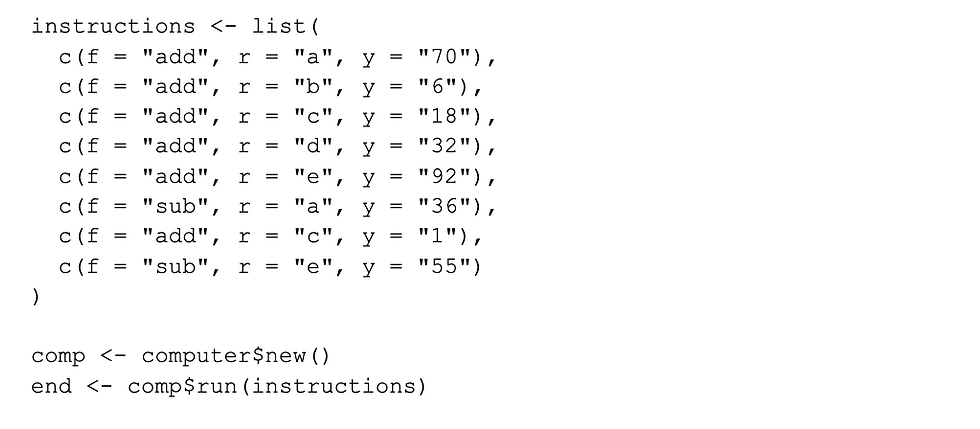
After run() returns, each register holds an integer. To get a string back out, we walk through the register names, look up each one on end, convert from integer to character with intToUtf8(), and paste the result together:

Register ’a’ lands at ’82’ (the codepoint for "R"), `b` at `54`, `c` at `67`, `d` at `80`, and `e` at `85`, spelling `R6CPU`. 'Hello World' would have been fun, but there were so many registers to manage!
Why This is Actually About R6
I would not write a production virtual machine in R. If I needed real speed I would probably reach for Rust.
The reason to do this in R is that it forces you to use R6 for what it is actually good at: modeling abstracts that have identity and state over time. Most of the R I write is functional and immutable, because most of the time my data has identity and state at exactly one moment: when I load it. A CPU does not. A Shiny session does not. A long-running scheduled job in rpeat does not. The same object system that makes a toy interpreter work is the one I reach for when I need to model anything that changes.
The other reason is that defining registers and functions as standalone lists and then splicing them into an R6 class with unlist() is, to me, a small, satisfying demonstration of how flexible R's data structures are. The class isn't a monolith you write top-to-bottom in one R6Class() call. It's a bag of named things, and you can fill that bag however you like.
I'm hoping that by now you're a little more comfortable with R6 than you were before, and that the next time you hit a problem that has identity in it — a session, a connection, a simulation, a machine — you'll reach for the object system instead of threading state through twelve functions. Build the pieces first, then compose them.
R is not only a language for statistical computing and graphics. It is also a perfectly cromulent place to build a computer.
Gus Lipkin
Data Scientist
Lander Analytics
Subscribe to our Substack and below to our monthly emails for practical AI strategies for your organization: what to build, what to avoid, and how to make systems reliable in the real world.
Work with us: If you want help identifying the right first workflow, building a permissioned knowledge base, or training your team to ship responsibly, reach out at info@landeranalytics.com.
About the author: Gus Lipkin is a Data Scientist at Lander Analytics, where he writes software for data science practitioners and consumers.


