
DGX Spark Series (Part 2): Configuring the server with Ansible

Updated: Apr 24
When AI actually helps write infrastructure code

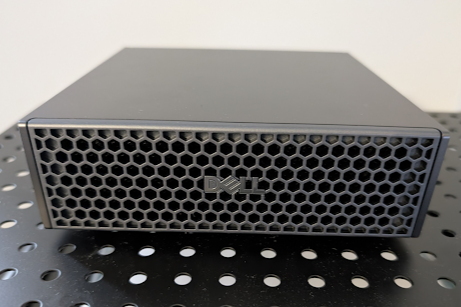
After the relatively easy process of setting up the DGX Spark (ok, technically the Dell Pro Max GB10, but I'm just calling it a DGX Spark for simplicity), it was time to configure the software side. A lot comes preinstalled, but there was more to add.
To make this server as maintainable as possible, everything had to be installed via Ansible. This is how we manage infrastructure for clients and it's the right approach for any machine that needs to stay consistent across updates. Normally our excellent infrastructure team would write the playbooks, but I wanted to get more hands-on experience with Ansible myself.
More than learning Ansible, though, this was an opportunity to test Claude Code. My previous experiments with ChatGPT for writing an R package and Copilot for developing a Kubernetes cluster left me underwhelmed. But enough people I trust were using Claude Code that it was time to give it a fair shot.
Getting Claude Code to Write Good Ansible
At first, I was not enjoying myself. I felt like Homer Simpson's drinking bird, just hitting "y" for yes over and over. Worse than that existential dread was that the code wasn't very good. I felt like I could write it better myself.
Joe Marlo on our team helped me get up to speed with agents and skills. This was important, because when I asked Claude Code to generate skills on its own, it failed to create the required SKILL.md file and completely missed the YAML frontmatter, even though it handled agents correctly. Knowing the expected structure beforehand saves a lot of debugging.
The real turning point was Context7. It provides an MCP server that delivers markdown documentation for just about every software framework out there. Insisting in both the CLAUDE.md file and individual skills that Claude should query the documentation before writing code dramatically improved output quality.
I also used the Claude web interface to build detailed skills for Ansible, Caddy, code reviewing, Docker, Linux administration and unit tests. The CLAUDE.md file explicitly instructs Claude to use these skills when writing playbooks and underlying templates like Caddyfiles and Docker Compose configurations.
What We've Configured So Far
The Ansible playbooks now handle:
Caddy (containerized) as a reverse proxy to access the DGX Dashboard, which is otherwise only available from localhost or via NVIDIA Sync
zsh as the default shell for all new users
User provisioning for team members
Tailscale integration for remote access (running natively, not containerized)
Now that the framework is in place for Claude Code to generate the playbooks and underlying files, I'm handing it off to the team to really test collaborative use of the tool.
The Takeaway
Anyway, after being initially lukewarm, I'm sold on Claude Code — with a caveat. The key was investing in scaffolding: well-written skills, clear instructions in CLAUDE.md and documentation access via Context7. Without that setup, the output wasn't competitive with writing the code yourself. With it, the tool starts earning its keep.
We're running internal training sessions to help the team adopt agentic workflows effectively. If your team is navigating similar tooling decisions, feel free to reach out.
Jared P. Lander Founder and Chief Data Scientist Lander Analytics
Subscribe to our Substack and below to our monthly emails for practical AI strategies for your organization: what to build, what to avoid, and how to make systems reliable in the real world.
Work with us: If you want help identifying the right first workflow, building a permissioned knowledge base, or training your team to ship responsibly, reach out at info@landeranalytics.com.
About the author: Jared P. Lander is Chief Data Scientist and founder of Lander Analytics, where he helps organizations build practical, measurable AI workflows grounded in strong data foundations.


