
DGX Spark Series (Part 1): Setting up the DGX Spark

Updated: Feb 20
Serious AI compute, no data center required

We recently got the Dell Pro Max GB10, Dell's version of the Nvidia DGX Spark. Both machines have identical specs: 128 GB of unified memory, the GB10 Grace Blackwell superchip, 4 TB of storage and the option to combine two units together for even more capacity. We went with Dell for procurement convenience, but the hardware is the same.
Why does this matter? This mini supercomputer lets us host LLMs locally, run GPU-accelerated model training and experiment with distilling large models into smaller, faster ones for production workflows. For teams exploring AI infrastructure without committing to a data center, this class of hardware makes that practical.
What It Enables
The use cases we're most excited about:
Self-hosted LLMs: Running models locally with Ollama and Open WebUI gives us full control over inference without per-token API costs
GPU-accelerated training: Fitting XGBoost and deep learning models with torch on local hardware
Model distillation: Taking large language models and refining them into smaller, faster models optimized for specific agentic tasks
Low-cost experimentation: Developers can iterate on model architectures and prompts without worrying about cloud compute bills
Physical Setup
The delivery box was smaller than the one for a laptop I bought the same week.

Unpacked, it's evident how compact this thing is.
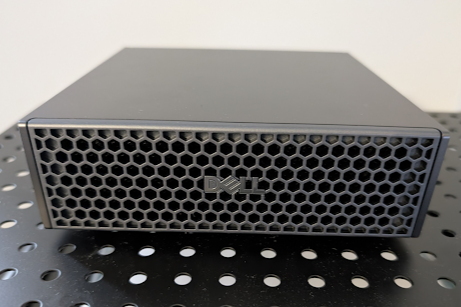
The physical setup was straightforward. I connected ethernet (WiFi is also supported), HDMI for initial configuration, the included USB-C power supply running at 240 watts and a USB hub.
One minor friction point: the DGX only has USB-C ports, so connecting USB-A peripherals required an adapter. The cheap KVM switch we use with other servers didn't work during initial setup but functioned fine afterward for headless operation.
There's a WiFi hotspot mode for remote setup, but having an attached keyboard, mouse and monitor was simpler for the initial configuration.
Since this is a pricey piece of hardware, I connected it to a UPS for protection. The 280-watt draw dictated the sizing. After some research, I settled on a compact APC unit rated for 540 watts, enough headroom without being physically larger than the computer itself.
Software Configuration
The initial software setup is minimal. Power on, and a setup wizard walks you through the basics — language, time zone, keyboard layout and creating a user account with root access. You can decline the telemetry opt-in, and after about twenty minutes of waiting, you're greeted with a standard Ubuntu desktop.

The machine comes with CUDA and related tooling pre-installed. Docker is ready out of the box, which matters because we plan to run everything through containers.
I installed Tailscale immediately so the entire team could access the machine remotely. From there, it operates like any Linux server, though it's worth noting this runs on ARM architecture (the Grace CPU) rather than x86 — something to keep in mind when pulling container images or compiling software.
What's Next
We'll be testing this hardware over the coming months — hosting local LLMs, benchmarking GPU-accelerated training and distilling large models into task-specific agents. We'll share what we learn in upcoming posts. If you're exploring similar infrastructure, feel free to reach out.
Jared P. Lander
Founder and Chief Data Scientist
Lander Analytics
Subscribe to our Substack and below to our monthly emails for practical AI strategies for your organization: what to build, what to avoid, and how to make systems reliable in the real world.
Work with us: If you want help identifying the right first workflow, building a permissioned knowledge base, or training your team to ship responsibly, reach out at info@landeranalytics.com.
About the author: Jared P. Lander is Chief Data Scientist and founder of Lander Analytics, where he helps organizations build practical, measurable AI workflows grounded in strong data foundations.


