DGX Spark Series (Part 3): When the Wrong-Sized GPU Is the Right Call

What we learned serving Chronos-2 from an R-friendly forecasting pipeline

A client came to us with a forecasting problem, and we ended up running it on a $4,000 GPU box built for 200-billion-parameter LLMs. The model we deployed has 120 million parameters and uses about 0.4% of the machine.
That looks like a mismatch, and it is. But it's a useful one. Most of what we learned on this project came from the gap between the hardware and the model, and from realizing that the gap works in our favor more often than against it.
This is a walkthrough of how we landed on Chronos-2, why the oversized box suited it, the load-testing result that surprised us, and what the GPU actually costs you under realistic loads.
A model that speaks numbers instead of words
If you have a forecasting problem that lives outside textbook ARIMA territory — hourly electricity prices dependent on dozens of features, multi-site retail, anything with hundreds of correlated series — you have probably already decided that gradient boosting is your default and that fine-tuning your own transformer is not worth it. The newer option in between is the zero-shot time series foundation model: roughly, an LLM that speaks numbers instead of words. You hand it history, it returns a forecast, and there's no training run.
The lineup as of mid-2026 looks like this: Google's TimesFM 2.5 (200M params) takes a 16K-token context but builds no covariate support into the transformer. Salesforce's Moirai 2.0 (87M) is a strong option, though its covariate support changed from the 1.1 release. Prior Labs’ TabPFN comes at it from a different angle — a tabular foundation model whose time-series variant, TabPFN-TS, reframes forecasting as tabular regression, and in our testing it performed on par with Amazon’s Chronos-2.
Chronos-2 won for more practical reasons. It has 120 million parameters, supports past and known-future covariates, handles categorical covariates and works directly with pandas. DataFrame in, DataFrame out, native quantiles and an experimental R path with no Python dependency. For a team that wanted to call forecasts from an existing R pipeline, those ergonomics mattered before benchmark performance really entered the picture.
It's also small: 120M params is about 240MB at FP16. Which brings us back to the box.
The mismatch works in our favor
The Spark has 128GB of memory, and Chronos-2 needs a quarter of a gigabyte of it. If you evaluate the setup one model at a time, it looks like the wrong tool. A Mac Studio would run it. A cloud GPU would run it. So would an old 3090, and any of them would feel like a more natural fit.
The first reason we used the Spark was practical: it was already running larger LLMs for RAG and agent pipelines. Adding a 120M-parameter forecasting model to a box with 100+GB of headroom was almost free from a memory standpoint.
We were no longer asking whether Chronos-2 alone justified the hardware. We were asking whether the Spark could act as shared local AI infrastructure, with several specialized models living side by side.
The Spark’s GB10 chip shares a single 128GB LPDDR5X pool between CPU and GPU. On a typical GPU you spend real effort rationing VRAM — nudging batch_size up until you hit a 12–24GB ceiling, then backing off. Here that ceiling isn't a concern, so we can push batch size until we saturate compute rather than memory. Chronos-2 helps by packing multiple series into one forward pass through an id_column, with group-attention handling the parallelism. On the Blackwell GPU we score 200 series in milliseconds, which is the difference between a two-second pipeline and a two-minute one. The same code runs orders of magnitude slower on the CPU.
So the box doesn't just fit the model; it takes the memory constraint off the table, which in turn shapes how you serve it.
Matching the wrapper to where you are
There are three ways to wrap the model, and the right one depends on how far along you are.
NVIDIA NIM was the first I considered, since Chronos-2 is architecturally close to an LLM — a T5 encoder patching numeric input into continuous embeddings — and NIM should suit that. But NIM for LLMs assumes text in, text out behind an OpenAI-compatible surface, while Chronos-2 wants DataFrames with timestamp columns, group IDs, and future-covariate frames through a custom predict_df(). Forcing it into the chat-completion mold means either rewriting the pipeline or wrapping it so heavily that you're not really using NIM anymore. It solves a problem we didn't have.
NVIDIA Triton Inference Server is the production-grade option — dynamic batching, Prometheus metrics, versioning, and health checks out of the box — but it expects tensors, not DataFrames. You write a roughly 100-line Python backend that reshapes tensors into a DataFrame, calls predict_df, and reshapes the result back. That's worth doing once you're serving hundreds of concurrent clients. We weren't there yet.
That left FastAPI, which needs the same translation layer Triton would, without the extra abstractions to learn. So that's where we started:
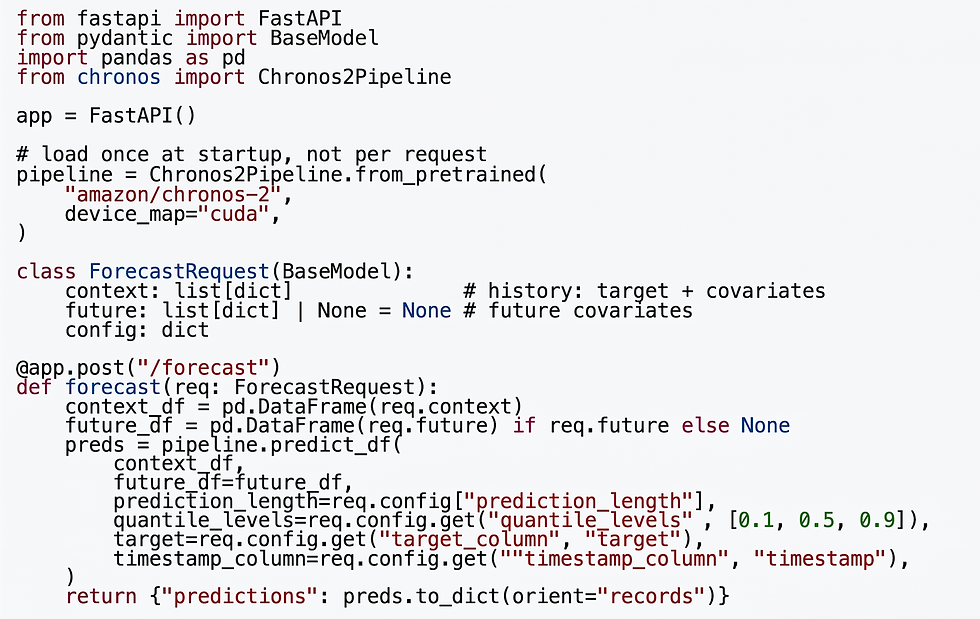
The Dockerfile is similarly minimal: a python:3.11-slim base, pip install -r requirements.txt, copy in app.py, run uvicorn app:app --host 0.0.0.0 --port 8000. The chronos-forecasting, fastapi, uvicorn, and pandas packages are the only real dependencies.
On the Spark itself:

From R, the call site is whatever you want it to be. We use httr2 to POST a list of context rows and a list of future rows, and parse the returned quantile columns. The R pipeline does not need Python or PyTorch baked into it, just an HTTP client. That separation alone is worth the trip.
Things that broke first
Twenty concurrent requests came back in 1.9 seconds of wall clock, which looks like parallelism. Unfortunately, it was mostly just a fast queue.
The requests in that first test were small — 720 hours of context, two covariates — so each finished in milliseconds, and what looked like concurrency was really just how fast the queue drained. A single uvicorn worker serializes every request through one GPU forward pass at a time. Switch to a realistic payload — 2,160 hours, 40 covariates, about 6 seconds each — and those same 20 requests take roughly two minutes, processed one after another regardless of how concurrent the client believes it's being.
The fix is to run more workers (uvicorn --workers 4), and here the oversized box helps again. On most GPUs that's a problem, because each worker loads its own copy of the model into limited VRAM. On 128GB of shared memory, four copies of a 240MB model is a rounding error, so you can simply spin them up (async with a thread pool works too, but once you're hand-rolling either approach you're rebuilding what Triton already does, which is a good sign it's time to move to Triton).
That warning about one forward pass at a time matters more once you know what a pass actually costs.
Scaling characteristics from real stress tests
These numbers are from a chronos-2 (120M) instance running on the Spark at FP16, hit from a remote machine over our internal network. Single uvicorn worker. Each cell is the median of a few runs.
Dimension | Result |
Context size scaling | ~2.5ms per hour of history. 1 week = 0.2s, 1 year = 2.4s, 2 years = 4.6s |
Horizon scaling | Nearly free. 24h vs 720h forecast is a 0.2s difference |
Covariate scaling | 5 covariates = 1.1s, 20 covariates = 3.6s, 40 covariates = 6.3s |
Realistic workload | 2,160h context + 40 covariates + 168h horizon ≈ 7s per series |
The horizon-is-free result is worth a beat. Chronos-2 patches its output, so once you have committed to the forward pass, more output steps are nearly free. Forecast a month instead of a day for almost the same cost. That is a real architectural win.
Covariate scaling, on the other hand, is roughly linear in the number of features. If you are passing 40 covariate columns, you are paying for them. If inference time is important to you, this is worth thinking about feature selection before you forward everything you have.
What to takeaway
The DGX Spark is more flexible than the marketing suggests. The 200B-param framing makes it easy to think every workload has to be enormous to justify the hardware. But small models are not automatically wasteful if the box is treated as shared local AI infrastructure.
Chronos-2 did not need 128GB of memory by itself. The useful part was what that memory let us stop worrying about: model copies, worker count, batch size and room for other workloads on the same machine. For this kind of deployment, the hardware was not justified by one forecasting model. It was justified by the operating model around it.
That is the larger lesson. Infrastructure choices start to make sense only when you look at the workload, the data interface, the serving layer and the system the model has to live inside.
You also do not need fancy serving infrastructure to get there. Docker plus FastAPI plus about 100 lines of Python plus a working nvidia-ctk config. Graduate to Triton when you actually need dynamic batching across hundreds of concurrent clients. Until then, the simple thing is the right thing.
We can help you figure this out
This is the kind of deployment question that looks like a hardware question at first. It usually is not. The harder part is matching the model, data interface, serving layer and operational expectations to the workload you actually have.
That is where the infrastructure choice starts to matter. The answer might be cloud. It might be Triton. It might be a small FastAPI wrapper on hardware you already own. The point is not to pick the fanciest serving stack. The point is to pick the one that fits the workload and can survive contact with the rest of your system.
That is the kind of problem we work on at Lander Analytics. If your team is evaluating forecasting models, local inference or GPU deployment patterns, reach out at info@landeranalytics.com.
Joe Marlo
Director of Data Science
Lander Analytics
Subscribe to our Substack and below to our monthly emails for practical AI strategies for your organization: what to build, what to avoid, and how to make systems reliable in the real world.
Work with us: If you want help identifying the right first workflow, building a permissioned knowledge base, or training your team to ship responsibly, reach out at info@landeranalytics.com.
About the author: Joe Marlo is Director of Data Science at Lander Analytics, where he designs agentic workflows, statistical models, and interactive frontends that put rigorous analysis into production.